
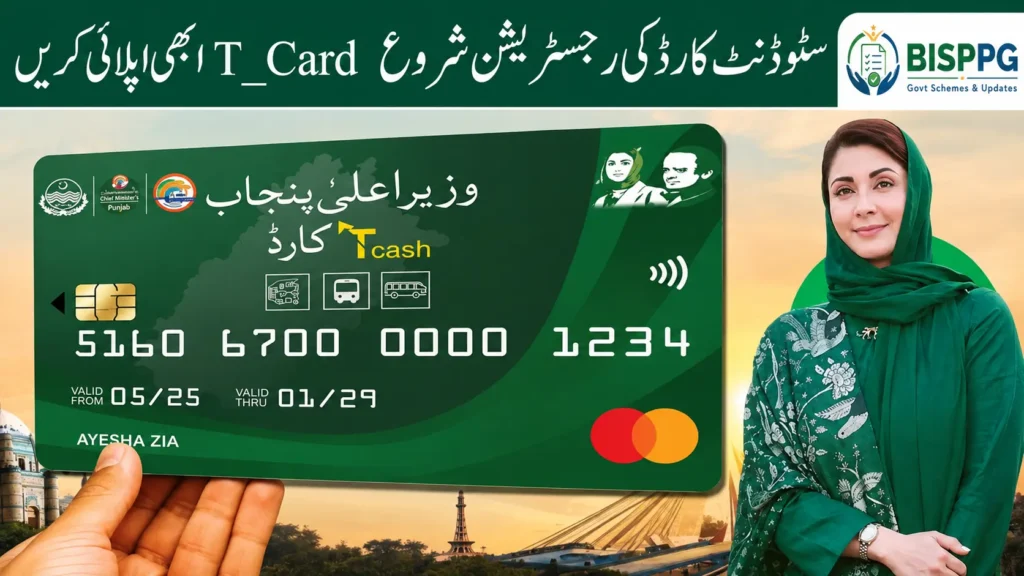
The CM Punjab T-Cash Card 2026 is a rechargeable smart card issued by the Punjab Masstransit Authority (PMA) so commuters can pay fares on the province’s public transit network without carrying cash. One card works across Metro Bus, Orange Line Train, Speedo Bus, and Electro Bus services, and it also doubles as a general-purpose debit card for everyday transactions.
This guide covers exactly who can apply, what the card costs, the three official application channels, and what to do if your card is lost, damaged, or approaching expiry.
What Is the CM Punjab T-Cash Card 2026?
The T-Cash Card is a contactless, rechargeable banking card built to unify fare payment across Punjab’s intra-city transit modes. Instead of buying separate tickets for the Metro Bus, Orange Line, Speedo Bus, and Electro Bus, commuters load funds onto one card and tap it at the gate.
Beyond transit, the card functions as a standard debit card, so it supports everyday financial transactions in addition to fare payments. Applicants are verified through NADRA, and card issuance follows regulatory standards set by the State Bank of Pakistan, which keeps the identification and financial-security process consistent with national norms.
CM Punjab T-Cash Card 2026
| Detail | Information |
|---|---|
| Issuing Authority | Punjab Masstransit Authority (PMA), Government of the Punjab |
| Card Type | Rechargeable smart card / debit card |
| Transit Services Covered | Metro Bus, Orange Line Train, Speedo Bus, Electro Bus |
| Eligibility | Public transport users in Punjab; NADRA-verified applicants aged 18+ |
| Card Issuance Fee | PKR 130 |
| Delivery Charges | PKR 130 |
| PayZen Service Charge | PKR 15 |
| Total Cost | PKR 275 |
| Application Channels | eTransit web portal, eTransit mobile app, helpline 1762 |
| Helpline | 1762 |
Who Can Apply for the T-Cash Card?
Anyone using public transport in Punjab is eligible to apply. Two conditions apply on top of that:
- NADRA verification: Your identity must be confirmed through the National Database and Registration Authority.
- SBP compliance: Because the card also functions as a debit instrument, issuance follows State Bank of Pakistan regulatory requirements.
Age and Document Requirements
According to PMA, applicants must be 18 years of age or older and hold a valid CNIC. Minors can still travel using a card registered to a parent or guardian rather than applying for their own. Only one application per person is accepted; PMA reserves the right to accept or reject any application that fails verification.
T-Cash Card Fee and Charges
The official PMA fee schedule breaks the cost into three components:
| Charge | Amount |
|---|---|
| Card Issuance Fee | Rs. 130 |
| Delivery Charges | Rs. 130 |
| PayZen Service Charge | Rs. 15 |
| Total | Rs. 275 |
Some earlier summaries of the scheme quote only the Rs. 130 card fee without the delivery and gateway charges, so budget for the full Rs. 275 when you apply. Pay only through the official eTransit portal, app, or an authorized channel — PMA explicitly warns against paying unofficial agents who claim they can issue the card for a fee.
How to Apply for the CM Punjab T-Cash Card 2026
PMA offers three official application channels. All three route through the same eTransit system and require CNIC and mobile number verification. Applying for the CM Punjab T-Cash Card 2026 is simple and can be completed through the official eTransit Punjab system. Passengers can submit their application online, verify their details, and receive their smart card at their selected pickup location.
There are three available application methods:
- eTransit Punjab Web Portal
- Official T-Cash Mobile App
- T-Cash Helpline (1762)
Apply Through the eTransit Punjab Web Portal
Follow these steps to submit your T-Cash Card application online:
Step 1: Open the Official Registration Portal
Visit the official eTransit Punjab portal and select the registration/apply option to start your application.
Step 2: Provide Your Personal Details
Fill in the required information, including:
- CNIC number
- Full name
- Active mobile number
- Contact details
- Preferred card collection station
Make sure all information matches your official records.
Step 3: Complete Identity Verification
Your details will be verified through the digital identity verification process. Ensure your CNIC and mobile number are correct to avoid delays.
Step 4: Confirm and Submit Your Application
Review all entered information carefully before submitting the form. After successful submission, save your:
- Application reference number
- Confirmation message
- Payment details (if applicable)
These details will help you track your application status.
Step 5: Receive Your T-Cash Card
Once your card is prepared, collect it from your selected station or chosen delivery option, depending on the availability of the service.
Apply Using the T-Cash Mobile App
For smartphone users, the mobile application provides a convenient way to apply and manage their card digitally.
Application Process:
- Download the official T-Cash/eTransit mobile application.
- Create an account using your CNIC and mobile number.
- Complete the required verification process.
- Enter your personal information.
- Select your preferred card collection option.
- Submit the application.
- Wait for approval and card processing.
The mobile app is useful for users who want easier access to card services, including digital management and balance-related features.
Apply Through the T-Cash Helpline (1762)
Passengers who cannot apply through the website or mobile app can use the official helpline service.
How It Works:
- Call 1762 to connect with the T-Cash support team.
- Provide your CNIC and required personal details.
- The representative will guide you through the registration process.
- Follow the instructions for card collection after approval.
This option is especially helpful for commuters who have limited internet access or need assistance during the application process.
Quick Comparison of Application Methods
| Application Method | Best For | Requirements |
|---|---|---|
| eTransit Web Portal | Online applicants | CNIC + Mobile Number + Internet |
| Mobile App | Smartphone users | CNIC + Registered Mobile Number |
| Helpline 1762 | Users needing assistance | CNIC verification |
Where to Collect Your Card
During the application, you select a station where your card will be held for pickup. Once the card is ready, it stays available at that station for 10 days. If you don’t collect it within that window, it may be returned or require reprocessing — so keep an eye on your application status if you’ve chosen station pickup.
How to Check Your T-Cash Card Application Status
You can track your application or card status through any of the following:
- eTransit web portal — log in and check the status of your application.
- eTransit mobile app — view real-time status from your account.
- Helpline 1762 — a representative can look up your application and confirm pickup readiness.
Using the T-Cash Card for Travel and Payments
Once activated, the T-Cash Card works as a single fare instrument across Punjab’s integrated transit network — Metro Bus, Orange Line Train, Speedo Bus, and Electro Bus — so there’s no need to buy separate tickets for each mode. It’s one of three accepted fare media on PMA services, alongside QR code tickets and the eTransit mobile app itself.
Because the card also operates as a debit card, it supports everyday financial transactions beyond transit, subject to the usual banking terms that apply to any SBP-regulated card product. If your card doesn’t register at a bus or train gate, contact station staff on the spot or call the helpline at 1762.
Benefits of CM Punjab T-Cash Card 2026
The CM Punjab T-Cash Card simplifies daily travel by providing a single smart card for cashless payments across Punjab’s public transport network.
Key Benefits:
- Cashless Travel: Pay fares digitally without carrying cash or buying separate tickets.
- Multiple Transport Access: Use one card across Metro Bus, Orange Line Train, Speedo Bus, and Electro Bus services.
- Faster Payments: Tap and travel with a convenient contactless payment system.
- Digital Management: Apply, track, and manage card services through the eTransit system.
- Secure Usage: CNIC-based verification helps ensure safe and reliable card issuance.
Card Expiry, Loss, and Replacement
The T-Cash Card carries an expiry date printed directly on the card; you can request renewal or replacement once it expires. If your card is lost or damaged, report it immediately through the helpline (1762) or the official portal so it can be blocked, then apply for a duplicate card — PMA lists the replacement fee at Rs. 275, the same as a new card.
Student T-Cash Card
Alongside the general T-Cash Card, the eTransit app lists a separate Student T-Cash Card option under its “My Cards” section. If you’re a student who regularly uses Punjab’s mass transit system, check the eTransit app or call 1762 for current student eligibility documents and any fare terms that apply to this card type, since these details are managed through the app rather than published in full on PMA’s main pages.
Mistakes to Avoid When Applying
- Entering mismatched CNIC details — even small typos can stall or reject NADRA verification.
- Using an unregistered or unreachable mobile number — you’ll miss OTPs and status updates.
- Paying unofficial “agents” — apply and pay only through the eTransit portal, app, or helpline 1762.
- Missing the 10-day pickup window — if you chose station collection, track your status so the card isn’t returned or reprocessed.
- Letting the balance run low before travel — keep enough loaded for at least a couple of trips to avoid being turned away at the gate.
Frequently Asked Questions
What is the CM Punjab T-Cash Card 2026?
The T-Cash Card is a rechargeable smart card for paying fares on Metro Bus, Orange Line Train, Speedo Bus, and Electro Bus services. It also works as a debit card.
How much does the T-Cash Card cost?
The total cost is Rs. 275, including card fee, delivery charges, and service charges.
Who can apply for the T-Cash Card?
Anyone using public transport in Punjab can apply. Applicants need a valid CNIC and must be 18 or older.
How can I apply for the T-Cash Card?
You can apply through the eTransit Punjab portal, eTransit mobile app, or helpline 1762.
Where can I collect my card?
Collect it from the selected station after approval. The card is kept there for 10 days.
How can I check my application status?
Check through the eTransit portal, mobile app, or call 1762.
Does the T-Cash Card expire?
Yes, the expiry date is printed on the card. You can renew or replace it after expiry.
What if my card is lost or damaged?
Report it through the portal or helpline 1762 to block it and request a replacement.
Can I use the T-Cash Card for other payments?
Yes, it can also be used for financial transactions as a debit card.
Is there a Student T-Cash Card?
Yes, students can apply through the eTransit app. Check eligibility through the app or helpline 1762.
Can I submit multiple applications?
No. Only one application per person is accepted.
What if my card does not work?
Contact station staff or call helpline 1762 for support.
Is the process the same in Lahore, Rawalpindi, and Multan?
Yes, applications are processed through the same eTransit system, with city-specific support available.